



A call with David Mitroff, Ph.D.
Talk through your business with David
Quick answer
CRM stands for customer relationship management. A CRM can be a software system or, at the start, a spreadsheet and a calendar. What matters is that every contact has a record, every conversation has a next step and every next step has a reminder. Start simple, use it every day and add tools only when the volume calls for them. Piedmont Avenue Consulting, Inc. works with owners across the San Francisco Bay Area, Los Angeles, Orange County and New York on the systems behind their follow-up.
Key takeaways
- A CRM, or customer relationship management system, is where every contact, conversation and next step lives, so nothing depends on memory.
- David writes that he once kept follow-ups in his head, and the ones he forgot were the expensive ones.
- A spreadsheet and a recurring calendar block can carry an owner a long way before software earns its place.
- User adoption decides whether any tool succeeds, and a CRM that nobody updates gives a false picture of the business.
What is a CRM? It is the one place where a business keeps every contact, every conversation and every next step, so nothing depends on someone’s memory. At Piedmont Avenue Consulting, Inc., we are a business and marketing consulting firm that works with owners in the San Francisco Bay Area, Los Angeles, Orange County and New York to start, grow and scale their businesses. One of the first things David Mitroff, Ph.D., asks a new client is how they keep track of their leads, their scheduling and their invoicing, and many are relying on memory and email.
The plain definition
A CRM, or customer relationship management system, is a record of the people your business knows and what happens next with each of them. A typical record holds:
- Who they are. Name, company, role and how to reach them.
- Where you met. The event, the introduction or the inquiry that started the relationship.
- What you talked about. A short note after every conversation.
- What happens next. The call you promised, the proposal you owe or the invitation to send.
- When. A date and a reminder for that next step.
Software adds features on top: email templates, automatic sequences, pipelines, reports and connections to your calendar and invoicing. The definition stays the same. A CRM is where the follow-up lives.
Fields worth adding once the basics work
The five parts above are enough to start. Once the habit holds, a few more fields make the record more useful:
- Type. Client, prospect, partner, referral source or vendor.
- Source. How the person first found you, so you can see which marketing works.
- Stage. For prospects, where the conversation stands: first call, proposal out, decision pending.
- Last contact date. The date you last spoke, so a quiet relationship shows up before it goes cold.
- Personal details that matter. The thing you would want to remember next time you see them.
That last field is the one most owners skip, and it is often the most valuable.
“Keep it all in one place, whether that’s a spreadsheet or a CRM, and make a note of how you know each person. Six months from now, “Met at the bank reception, loves sailing” is worth more than any title.”
David Mitroff, Ph.D., in The Event Effect, Chapter 9: Your Invitation List
Write it down the same day.
What to note, and what to leave out
Personal details make a record useful, and they also carry responsibility. Note what a person told you in a business setting that will make the next conversation better: what they are working on, the conference they are heading to, the hobby they brought up, the colleague they want to meet.
Leave out anything you would not want them to read. Health, family troubles, money worries and anything said in confidence stay out of the system. A good test is simple: if the person asked to see their record, would you be comfortable showing it? If the answer is yes, the note belongs. If not, keep it to yourself.
The same care applies to who can see the records. Give each person on the team access to the relationships they work with, and keep sensitive client files in the systems built for them.
Why owners need one
In The 45 Day Consultant, David writes about what happened before he had a system.
“Early on I kept follow-ups in my head, and the ones I forgot were the expensive ones.”
David Mitroff, Ph.D., in The 45 Day Consultant (2026 edition), Chapter 3: Becoming the Expert
His fix was to put them in a system: a CRM with a reminder on every conversation, a calendar entry for every check-in he promised, a template for the note he sends after meeting someone and a sequence that goes out to a new contact over the following weeks. As the volume grows, he writes, the tools take over the remembering, and attention goes to the conversation instead of the logistics.
Most owners meet more people than they can remember. A CRM is how those meetings turn into relationships instead of a stack of business cards.
Start simple
David’s advice in the book is to start with what you will actually use. A spreadsheet and a recurring calendar block can carry an owner a long way. Software earns its place when the list is too long to manage by hand, or when more than one person needs to see it.
In the chapter on technology, he adds a warning that applies to every tool.
“It’s also vital to remember that user adoption determines the success of any tool.”
David Mitroff, Ph.D., in The 45 Day Consultant, Chapter 21: Leveraging Technology in Consulting
A CRM that nobody updates is worse than none, because it gives a false picture. Before you buy one, write down how your follow-up works today, step by step, then choose the simplest tool that fits those steps. Our software and subscription audit checklist covers how to review the tools you already pay for.
The book puts the rule in one line.
“Start simple, because a system you actually use beats a sophisticated one you abandon.”
David Mitroff, Ph.D., in The 45 Day Consultant (2026 edition), Chapter 3: Becoming the Expert
Begin with a spreadsheet.
A spreadsheet CRM, column by column
If you are starting from nothing, open a spreadsheet and give it these columns:
- Name, company and role.
- Email and phone.
- Type: client, prospect, partner or referral source.
- Where you met or how they found you.
- Last conversation, in one line.
- Next step, in a few words.
- Date of the next step.
Sort by the last column every Monday morning. Everything due this week is at the top. Put the same dates on your calendar as reminders, and the spreadsheet becomes a working system.
When to move to software
A spreadsheet stops working at a certain point, and the signs are easy to spot:
- More than one person needs to update the same list.
- You miss next steps because the list is too long to scan.
- You want reminders to arrive on their own, without copying dates to a calendar.
- You send the same follow-up email often enough that a template would save real time.
- Bookings from your scheduling tool and inquiries from your website need to land in the same place.
When two or three of those are true, software has earned its place.
How to choose CRM software
Most CRM tools offer far more than a small business needs. Choose on the few things that decide whether your team will use it every day:
- Fast entry. Adding a contact and a note takes less than a minute, including from a phone.
- Calendar and email connection. Meetings and messages attach to the right record on their own.
- Reminders. Every next step can carry a date and a notification.
- Shared access. Each person on the team can see and update the records they work with.
- Your scheduling tool. New bookings create or update a record automatically.
- Easy export. Your data can leave with you if you change tools later.
Run a real week in the tool before you commit. Enter your top relationships, log every conversation and work from its reminders. If the week feels like extra work, try the next tool. Our article on small business technology myths covers what new software can and cannot fix.
What to put in it first
- Your top relationships. The clients, partners and referral sources who matter most. Our guide to your top twenty list shows how to choose them.
- Everyone from your last event. Each guest, with a note on what you talked about and the next step.
- Every open conversation. Proposals out, calls promised and introductions you offered to make.
- The people who said “not this time.” In The Event Effect, David writes that an executive who cannot come on the date is still interested, and that reply is the start of a conversation.
Losing track of the people you meet?
Schedule a call with David Mitroff, Ph.D. We look at how you track contacts and follow-up today, and what to set up first.
Or call David at 510-761-5895, 8 AM to 8 PM, seven days a week.
How a CRM changes a business
In The Event Effect, David describes a franchise owner whose catering business took requests by phone and fax, with too much of it living in one person’s memory. The first step in growing that business was one customer relationship management system, where every request was assigned, staffed, confirmed and invoiced in one place. Our case study, from twenty catering events a year to seven hundred, tells the rest.
The same pattern holds for a consultant, a law firm or a shop. When every inquiry has an owner, a next step and a date, fewer people fall through the cracks, and the business can grow without the owner remembering everything.
A CRM in four kinds of business: short scenarios
These are composites, not client stories. They show how the same definition fits very different work.
- A solo consultant. Every first call, booked through the website, creates a record. After the call, the consultant writes two lines and sets the next step. On Mondays the list shows who is waiting for a proposal and who is due a check-in.
- A restaurant with private events. Every inquiry for a party gets a record with the date, the head count and the contact. The manager sees which events need a menu, a deposit or a confirmation, and past hosts get an invitation to book again next year.
- A small law firm. Each potential client is logged at intake with the source and the matter type. Referral sources get their own records, so the firm can thank them and see who sends the best fits.
- A contractor. Each estimate request becomes a record with the address, the scope and a follow-up date. A month after every finished job, a reminder prompts a call to ask for a review and an introduction.
In each case the tool is ordinary. The value comes from the next step and the date beside it.
What a CRM is not
- A mailing list. A list of addresses is a start. A CRM adds the conversation and the next step.
- A sales machine. It keeps track of relationships. The relationships still come from showing up, inviting people and following up in person.
- A fix for a broken process. Software amplifies the process you already have. If the follow-up does not happen today, a new tool will not make it happen on its own.
In the same chapter, David puts it plainly.
“Tools are not solutions by themselves. They amplify what already exists.”
David Mitroff, Ph.D., in The 45 Day Consultant, Chapter 21: Leveraging Technology in Consulting
Map the process first, then let the software carry it. Our streamlining operations work starts in the same place, with how the work flows today.
Keep the data clean
A CRM is only as good as what goes into it. Poor entries give you a confident picture of a business that does not exist. A few rules keep the records honest:
- One owner per record. Each relationship has a named person responsible for the next step.
- Notes within a day. Write the note while you still remember the conversation.
- One spelling, one record. Search before you add, so the same person does not live in three places.
- A next step on every open record. A record with no next step is a relationship nobody is tending.
- A monthly cleanup. Merge duplicates, close dead conversations and update roles and companies.
A weekly routine that keeps it working
The system works when the habit does. Here is a simple week:
- Monday. Sort by next-step date and plan the week’s follow-ups.
- After every meeting or call. Two lines of notes and a dated next step.
- After every event. Enter every guest and every “can’t make it” within two days, while the night is fresh. Our article on event follow-up myths covers what tends to slip.
- Friday. Fifteen minutes to close what is done and move what slipped.
Thirty minutes a week, spread across those moments, is often enough for a small business.
Common mistakes with a CRM
- Buying before mapping. Choosing software before you know your own follow-up steps.
- Entering everyone and following up with no one. A big list with no next steps is a mailing list.
- Letting one person carry it. When only the owner updates the system, it stops the week the owner gets swamped.
- Using it only for prospects. Current clients and referral sources need follow-up too. Our client retention checklist shows what to track for the clients you already have.
- Skipping the personal note. Titles and phone numbers are easy to find. What you talked about is not.
- Switching tools every year. Each switch costs data and habits. Stay with one long enough to know whether the habit is the problem.
How to tell whether it is working
A CRM earns its keep when a few numbers move in the right direction:
- Overdue next steps. The count goes down and stays low.
- Response time. New inquiries get a reply sooner.
- Inquiries to meetings. More of the people who reach out end up on the calendar.
- Source of new clients. You can name where each new client came from, so you know which marketing to repeat.
- Repeat and referred work. Past clients come back and send others, because nobody went quiet on them.
Look at those numbers once a month. Our guide on how to measure marketing results covers five numbers any owner can track, and the CRM is where most of them come from.
Pair it with a follow-up habit
A CRM works best alongside a daily or weekly habit: a block on the calendar to write the notes, send the follow-ups and look at what is due. Our guide to the follow-up system that wins more business covers the habit, and our guide on how to set up online scheduling covers the step where people book their next call on their own.
What to do this week
- Write down how your follow-up works today, step by step.
- Open a spreadsheet with the seven columns above.
- Enter your top relationships and everyone from your last event.
- Give every open conversation a next step and a date.
- Put two recurring blocks on your calendar: Monday planning and Friday cleanup.
How we work with owners on systems
We look at how you track contacts, conversations and next steps today, choose the simplest system that fits, set it up with your top relationships and your last event and build the follow-up habit around it. We start with an assessment, agree on the priorities that matter most, and define what success looks like, then build a 90-day plan for ongoing work. We start with an initial consultation and a paid assessment, then build a ninety-day plan and a twelve-month marketing calendar. Learn more about our business consulting services.
From David’s books
Run a law firm?
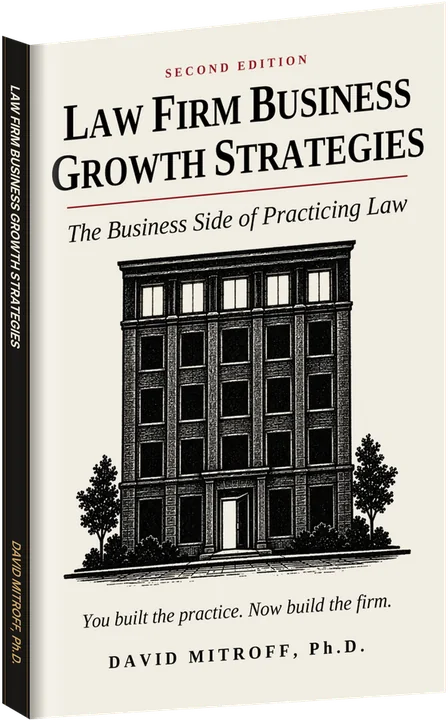
David Mitroff, Ph.D. covers this for attorneys in Law Firm Business Growth Strategies, Second Edition, in the chapters “Mapping the Firm” and “Technology in the Law Firm”.
Read “Mapping the Firm”Read “Technology in the Law Firm”Law Firm Growth GuideLaw firm consultingGet the book on Amazon
Quick self-assessment
Score your law firm
Answer nine questions and get an initial score out of 100 for how easy your firm is to find and choose online. It is written for law firms, and built on the nine keys from David Mitroff, Ph.D.’s book Online Business Growth Strategies.
Score your law firmTake action
Your next three steps
- Write down how your follow-up works today, step by step, before you choose a tool.
- Enter your top relationships, everyone from your last event and every open conversation first.
- Block time on your calendar each week to write notes, send follow-ups and review what is due.
In their own words
What clients say about working with us
“McDowall Cotter started working with David Mitroff and right away things started to happen. We have managed to fill up our seminar rooms again, he has found us great new staff to run our marketing department, and business is booming. More than a marketing consultant, he is also a business confidant, helping us keep course on our goal to growth.”
 David RosenbaumPartner, McDowall Cotter, APC

“I have known and worked with David for over 15 years, across numerous companies and ventures. He helped us build and promote Clark Meyers. He is my go-to marketing guru and has introduced me to the resources I need to grow.”
 Conor MeyersCo-Founder, Clark Meyers PC

Read more client stories or see our case studies.
Frequently asked questions
Frequently asked questions
What does CRM stand for?
CRM stands for customer relationship management, a system for keeping track of every contact, conversation and next step in one place.
Does a small business need CRM software?
Not at first. David Mitroff, Ph.D., writes that a spreadsheet and a recurring calendar block can carry an owner a long way, with software added once the volume grows.
What goes into a CRM?
A CRM record holds who the person is, where you met, what you talked about, the next step and the date for that next step.
Why do CRMs fail?
In The 45 Day Consultant, David Mitroff, Ph.D., writes that user adoption determines the success of any tool, so a CRM that nobody updates gives a false picture.
When does a small business move from a spreadsheet to CRM software?
Move to software when more than one person needs to update the list, when next steps are getting missed or when bookings and inquiries need to land in one place automatically.
How much time does a CRM take each week?
For a small business, a short Monday planning block, notes after each meeting and a short Friday cleanup are often enough, adding up to about half an hour a week.
Does Piedmont Avenue Consulting, Inc. work with owners on CRM and follow-up systems?
Yes. Piedmont Avenue Consulting, Inc. works with owners in the San Francisco Bay Area, Los Angeles, Orange County and New York on the systems behind their follow-up. Schedule a call with David to talk about your business.
Let’s grow together.
Schedule a call with David. Tell us how you keep track of people today, and we will look at what to set up first.
Or call David at 510-761-5895, 8 AM to 8 PM, seven days a week.
About the author
David Mitroff, Ph.D. wrote this article. He is the founder of Piedmont Avenue Consulting, Inc., a business and marketing consulting firm serving the San Francisco Bay Area, Los Angeles, Orange County and New York. Meet David or read more articles by David.
- Founder and Business Growth Strategist at Piedmont Avenue Consulting, Inc.
- Doctorate in clinical psychology, with additional coursework in business administration, law and culinary arts; bachelor’s and master’s degrees.
- Taught marketing and entrepreneurship at the University of California, Berkeley for more than seven years.
- Author of several books, including The 45 Day Consultant, The 45 Day Consultant Field Guide, Online Business Growth Strategies, The Event Effect: Invite, Don’t Sell, and Law Firm Business Growth Strategies (Second Edition).
- Started seven companies; previously owned and ran a recruiting and staffing company.
David works with a small team of consultants and specialists on every engagement. Meet our team or read about Piedmont Avenue Consulting, Inc.